
How the University of Notre Dame Transformed Campus Operations with ArcGIS Indoors

The University of Notre Dame manages more than 11.5 million square feet of building space across 200+ buildings on 10 global campuses spanning 5 countries.
In October 2024, the University Facilities Information Department (UFI) initiated a migration of its indoor mapping, space planning, and asset mapping operations from the legacy Cartegraph InVision system to Esri’s ArcGIS Indoors.
The project’s goal was to replace the legacy software with a modern, sustainable, and configurable Facilities Information Management System that leverages Esri’s ArcGIS Indoors, ArcGIS web experiences, and dashboards. This transition ensures long-term support, enhanced integration with enterprise GIS systems, and improved space and asset management across the University.
The project was conducted in collaboration with Cloudpoint Geospatial, an Esri Gold Business Partner with an Indoor GIS Specialty.
The Foundation: Enterprise GIS Platform
To provide the infrastructure and software environment to support the Indoor GIS, Cloudpoint configured and deployed two ArcGIS Enterprise instances on Notre Dame cloud servers to serve as Test and Production environments.
Step 1: Automating indoor data updates and integration with Enterprise Resource Planning (ERP) and Integrated Workplace Management System (IWMS)
The University's portfolio of building floor plans was migrated to the ArcGIS Indoors data model and published in the Enterprise GIS Portal. Due to the number of buildings and regular updates to the floor plans, the University required a hands-off process to keep the indoor GIS synchronized with the source CAD data. While ArcGIS Indoors has tools for updating GIS data from CAD, an automated Python script was developed to manage the ongoing, daily ingestion of updated floor plans, updating the Indoors Enterprise geodatabase and overwriting the published Indoor feature services.
The floor plan update process is fully automated from the time the CAD operator saves edits to the Indoor GIS database being refreshed. The automation tool generates daily email reports for UFI staff detailing the overnight CAD-to-GIS data conversion results.
To maintain accurate space occupancy data, the Indoor GIS system is integrated with the University’s Enterprise Resource Planning (ERP) system, the official source for all employee information. Each night, an automated geoprocessing tool pushes updates from the ERP into the “Occupants” GIS layer. In turn, office assignments made in GIS during working hours are pushed back to the ERP after business hours, completing the cycle for managing employee space assignments.
Additionally, the University IT department created an integration between the Indoor GIS and the University’s Integrated Workplace Management System (IWMS). This connection ensures GIS updates to space classifications (such as Postsecondary Education Facilities Inventory and Classification Manual (FICM) codes) and departmental space allocations are synchronized to the IWMS.
To complete the daily update cycle, a final automated process exports floor plans for all building levels that were edited in the preceding 24 hours. The PDFs are linked within the ArcGIS Indoors Viewer and other Indoor web applications, providing users with the most up-to-date building floor plans.
The whole data update process is 100% automated. From converting AutoCAD files to Indoor GIS format, synchronizing employee data with office assignments, integrating GIS space classifications with workplace management software, and exporting updated PDF floor plans, ArcGIS Indoors has enabled the integration of these systems in a fully automated, hands-off, synchronized workflow, ensuring all sources of record are kept up to date without requiring additional time and resources on the part of the UFI team.
By integrating these data sources, Notre Dame's Indoor GIS system demonstrates that GIS can serve as the central hub for connecting individual facility management systems.
Step 2: Configuring indoor web applications for campus users
UFI set out to make space data available and actionable for the entire campus community. To achieve this, Cloudpoint configured the Indoors Viewer app to explore centralized floor plans and space information.


Additionally, the Indoor Geodatabase provides the foundation for a variety of ArcGIS Experience Builder apps and dashboards configured to support viewing, editing, and reporting.
These apps support:
Space use verification walkthroughs
Classroom inventories
Building asset mapping
Organization space allocation reporting


To provide UFI with a complete view into Notre Dame’s space inventory, ArcGIS Dashboards were built to provide metrics for asset counts by building, level, and organization, square footage breakdowns (assignable space vs non-assignable space), space usage, occupancy, availability, vacancy, capacity, and content summaries of the Indoors Geodatabase.
Step 3: Managing unique campus space management requirements
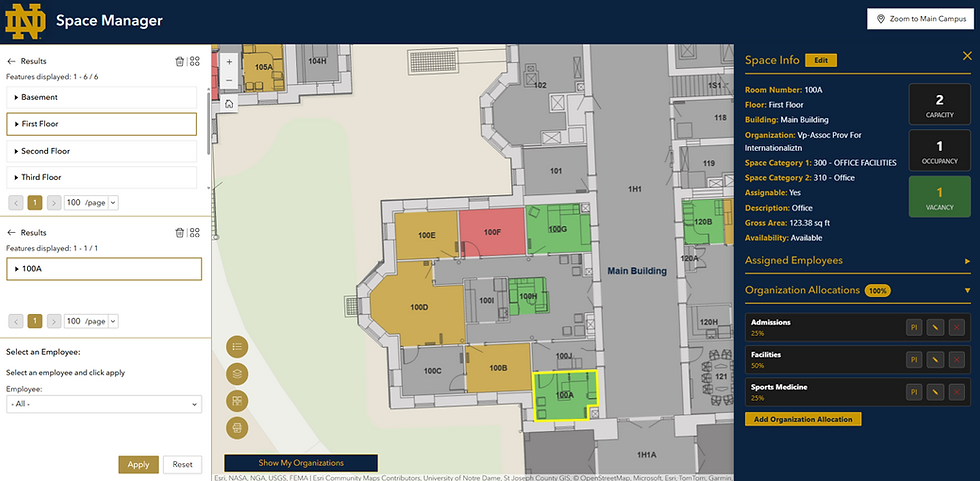
University campuses have unique space management requirements, ranging from office, residential, teaching, and research space to sports facilities, dining and event space, maintenance, mechanical, and administrative spaces, and private and public areas. At the University of Notre Dame, these requirements include allocating space to multiple organizations based on percentage occupancy, assigning Principal Investigators (PI) to those allocations (such as lab space), and tracking dual (primary and secondary) office address types. The University also has designated building managers responsible for spaces allocated to the organizations they manage, requiring strict role-based editing controls. While role-based editing and organization space allocations are now supported out of the box in the current version of the Space Planner app, they were not available during the implementation phase of this project.
To deliver these specific capabilities, Cloudpoint extended the ArcGIS Indoors platform using custom-built widgets to enhance organization allocation functionality and provide the reporting metrics required at Notre Dame. This customization was made possible by the Experience Builder Developer Edition, which allowed deployment of custom tools and application interface functions within the Enterprise GIS application.

Step 4: Reporting and Audit Trail
To ensure transparency and accountability, the Notre Dame ArcGIS Indoors implementation features a robust backend edit history. Whenever a user modifies an employee assignment, adjusts a space allocation, or updates a Principal Investigator (PI), the application automatically logs the edit into a series of database tables. The system captures the original and modified values, creating a historical record of all changes made, with the specific building, level, and space identified.

The Result
The implementation of indoor GIS, particularly for space management, is a transformative step that positions GIS as the central, unified hub for facilities information at the University of Notre Dame. By integrating CAD, ERP, and IWMS, indoor GIS transforms siloed data into a single source of truth, ensuring long-term support and advanced functionality for space and asset management. The new data platform enhances decision-making and streamlines operations across campus by providing a highly governed, secure, and integrated system.
In line with UFI’s vision of making space data available and actionable, this effort directly benefits the entire Notre Dame community. It provides administrators with transparent and accountable space planning through robust Role-Based Access Control (RBAC) and an audit trail. It ensures that faculty and staff have accurate, up-to-date space assignment information via automated updates from the ERP. The deployment of indoor GIS Web Applications makes space data accessible across the campus community, empowering data-driven decisions that will support the long-term planning, maintenance, and strategic growth of the University.
The University of Notre Dame – University Facilities Information (UFI)
University Facilities Information (UFI) was established in October 2015 to serve as a central resource for key information about University facilities. The wide range of systems and processes that utilize facility information makes it crucial that space data be managed centrally and consistently, and in a timely fashion.
The UFI mission is to steward enterprise building and space data and share that data with leaders at all levels of the University to support their planning and maintenance activities.
Cloudpoint Geospatial
Cloudpoint Geospatial is a leading provider of comprehensive geospatial solutions and an Esri Gold partner with specialties in Indoor GIS and Network Management. Our team of highly experienced, educated, and certified professionals is known for providing data-driven solutions for organizations such as local governments, utilities, campus facilities, and public safety agencies.
Software used in this project:
ArcGIS Indoors, Indoors Viewer, Space Planner, ArcGIS Pro, ArcGIS Enterprise, Portal for ArcGIS, ArcGIS Data Interoperability Extension (FME), ArcGIS Experience Builder (Standard and Developer Edition), ArcGIS Dashboards, Python, TypeScript, JavaScript, HTML, VS Code, Windows Task Scheduler.


